
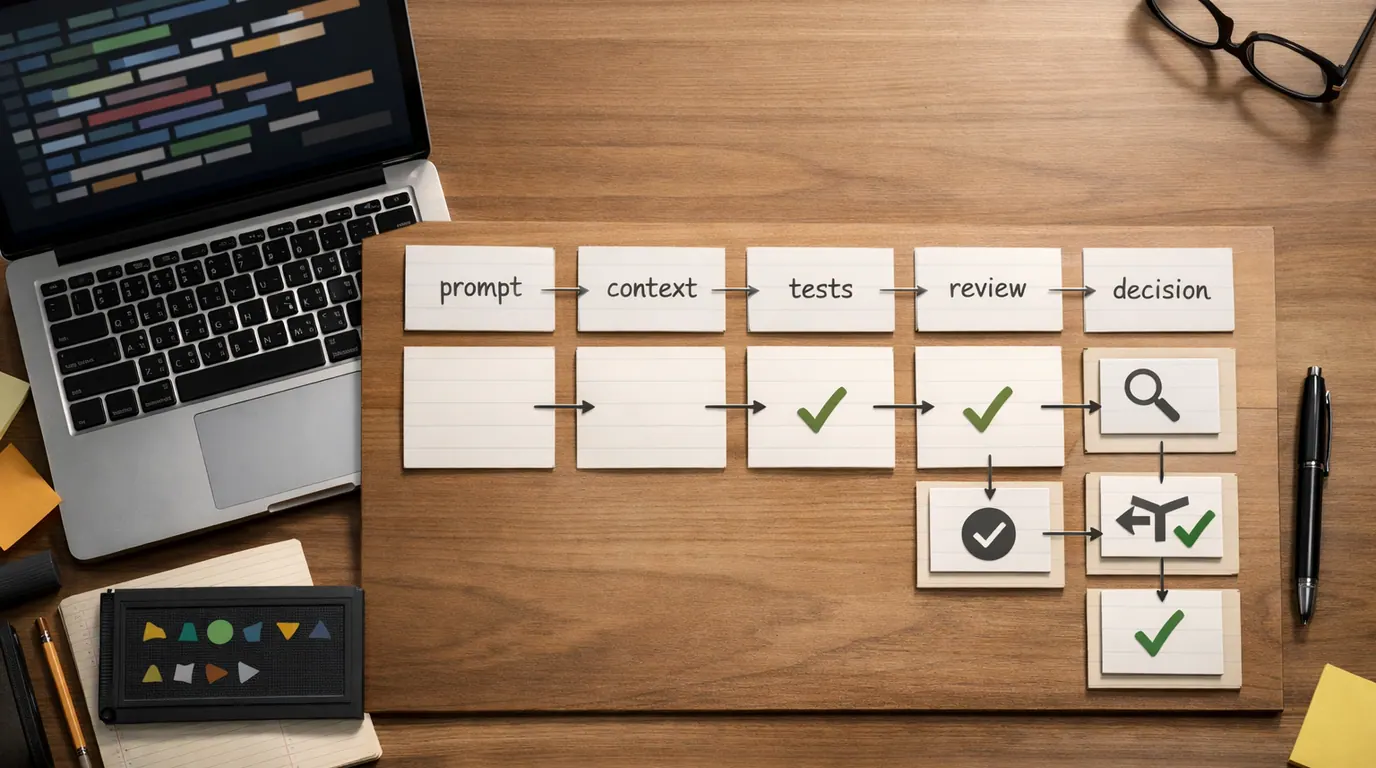
If you searched for “how to use ai for coding”, the useful answer is not “ask a chatbot to build everything.” The useful answer is a controlled loop: choose a small coding job, give the model real context, inspect the result, test it, and keep responsibility for the program.
AI is good at producing drafts, explaining unfamiliar code, turning an error into likely causes, suggesting test cases, and editing a narrow function. It is weaker when you ask it to own architecture, understand every hidden constraint in a codebase, or make security and production decisions without review.
Treat this as a how to use AI for coding guide for everyday development: learning a language, debugging a failing test, writing boilerplate, refactoring a module, reviewing a pull request, or building a prototype without letting the tool turn into an unaccountable teammate.
Ask for one explanation, one test, one function, one refactor, or one bug investigation before expanding the scope.
Share the relevant code, error, constraints, framework version, expected behavior, and local conventions the model must follow.
Read the diff, run tests, check edge cases, and reject code you cannot explain or maintain.
What AI Should and Should Not Do in Coding
AI for coding works best when it prepares a reviewable next step. It can make a developer faster by reducing blank-page time, translating stack traces, generating repetitive structure, suggesting tests, and explaining unfamiliar APIs. It should not become the final authority on whether the code is correct.
Use AI for tasks where the output can be inspected:
- Understanding: explain a file, summarize a function, map dependencies, or translate a stack trace into likely causes.
- Drafting: scaffold a function, command, type, migration, validation rule, regular expression, or small UI component.
- Testing: propose unit tests, edge cases, fixtures, mocks, and regression checks for a bug you already understand.
- Refactoring: simplify a small block, improve naming, remove duplication, or align code with an existing pattern.
- Review: flag risky assumptions, missing error handling, weak boundaries, inconsistent style, or untested branches.
Do not use AI as the only decision-maker for authentication, authorization, cryptography, payments, migrations, data deletion, compliance, deployment, or anything involving secrets. The more irreversible the outcome, the more the AI step should be limited to explanation, checklist creation, or draft support.
This is also how to avoid the common dependency trap. If the model gives you code, make it explain the moving parts, then close the loop by running the code and describing why the fix works in your own words.
The AI Coding Workflow to Use First
The safest how to use AI for coding workflow is a short cycle: define the job, provide context, ask for a plan or small change, inspect the output, test it, then decide whether to keep it.
| Stage | What to give AI | Useful request | Human review point |
|---|---|---|---|
| Understand the problem | Requirement, current behavior, expected behavior, error message, and relevant files | Explain the likely cause of this failing test and list three things to inspect before changing code. | Confirm the model understood the requirement and did not ignore a constraint. |
| Plan the change | Codebase conventions, framework version, affected files, and boundaries | Propose a minimal implementation plan. Do not write code yet. Include risks and tests. | Reject broad rewrites, unnecessary dependencies, or changes outside the task. |
| Generate a small diff | One function, component, query, command, or test file | Modify this function to handle the missing empty-state case while preserving existing behavior. | Read every line, compare against local style, and remove code you do not understand. |
| Debug with evidence | Stack trace, reproduction steps, failing input, logs, and the smallest code sample | List likely causes in priority order and suggest the next diagnostic command or assertion. | Run the diagnostic step yourself before accepting a fix. |
| Add tests | Requirement, bug report, existing test style, and edge cases | Create unit tests for success, empty input, invalid input, and regression behavior. | Make sure tests fail for the old bug and pass for the right reason. |
| Review before merge | Final diff, acceptance criteria, and known risk areas | Review this diff for correctness, security, maintainability, missing tests, and edge cases. | Treat the review as a checklist, not permission to merge blindly. |
For prompt structure, use the task, context, criteria, format, and review pattern from our guide to writing better AI prompts. Coding prompts need two extra details: the expected behavior and the test or command that proves the change works.
Build a Practical AI Coding Strategy
A useful how to use AI for coding strategy starts with the bottleneck, not the tool. People searching for the best how to use AI for coding usually need to know which part of the work should be assisted first.
Choose the job by risk and reviewability:
- Start with learning and explanation. Ask AI to explain unfamiliar syntax, a framework concept, or a confusing function. This is low-risk because you are not changing production code.
- Move to tests and examples. Test cases are a strong early use because they make behavior explicit and give you a way to catch bad generated code.
- Use AI for boilerplate after you know the pattern. CRUD handlers, form validation, CLI argument parsing, and simple components are good candidates when your codebase already has examples.
- Use AI for refactors only inside a boundary. Ask for one module, one function, or one repeated pattern. Large refactors create too much surface area for hidden mistakes.
- Keep architecture as a conversation. Ask for tradeoffs, failure modes, and questions you should answer, then make the design decision yourself.
- Keep a session note. At the end, write what changed, what was generated, which assumptions remain, and which tests were run.
This strategy matches a practical pattern in the research: strong AI coding use depends on procedures, context, and review, not random prompts. Google Cloud’s guidance on coding assistants emphasizes planning and context files, while GitHub’s advice for learning with coding tools stresses discrete, atomized tasks. Those ideas are simple but important: the model performs better when the task is bounded and the surrounding context is explicit.
If the work becomes a repeated team process, connect it to the operating discipline in our AI workflow automation guide. A coding assistant still needs an owner, allowed inputs, review points, failure handling, and a clear definition of done.
How to Use AI for Coding Examples
The most useful how to use AI for coding examples are ordinary. They show how to ask for help without outsourcing the thinking.
Debug a failing test
Weak use: “Fix this test.”
Better use: paste the failing test, the error, the function under test, and the expected behavior. Ask AI to list likely causes before editing code.
I have a failing unit test. Do not rewrite the implementation yet.

Expected behavior:
[describe the behavior]

Failure:
[paste test output]

Relevant code:
[paste function and test]

List the likely causes in priority order. Then suggest the smallest diagnostic step I should run.
Why it works: the model becomes a debugging partner instead of a patch generator. You still run the diagnostic step and decide what the evidence proves.
Write a small function
Weak use: “Write a validator.”
Better use: define inputs, outputs, allowed behavior, examples, and test cases. If the function touches security, payments, access, or personal data, ask for options and risks before code.
Write a TypeScript function that validates [input].

Requirements:
- Accepts: [shape]
- Returns: [shape]
- Rejects: [invalid cases]
- Must follow these project conventions: [style or examples]
- Include tests for: [cases]

Keep the implementation small and explain any tradeoffs after the code.
Refactor without changing behavior
Weak use: “Clean this up.”
Better use: state the behavior must stay the same, define the refactor goal, and require tests or a before-and-after explanation.
Refactor this function for readability without changing behavior.

Goals:
- Reduce nested conditionals
- Keep the same public API
- Do not add dependencies
- Preserve existing error messages

After the refactor, list exactly what changed and which tests should cover it.
Learn a new library
Weak use: “Teach me React Query.”
Better use: ask for a tiny working example, the mental model, common mistakes, and where to read the official docs. The GitHub Blog’s advice for learning new languages with AI points to the same habit: use the assistant to create feedback and context, not to skip understanding.
I know [current tool] and I am learning [new library].
Explain the smallest useful mental model, then show a tiny example that fetches data, handles loading, handles errors, and invalidates cached data.
After the example, list five mistakes beginners make and the official docs pages I should read next.
Review a pull request
Weak use: “Is this PR okay?”
Better use: give the requirement, diff, risk areas, and review criteria. Ask the model to find issues, not to approve the change.
Review this diff as a cautious senior engineer.

Requirement:
[what the change should do]

Review for:
- Correctness
- Missing tests
- Error handling
- Security and privacy
- Backward compatibility
- Simpler alternatives

Return findings in priority order. Do not rewrite unless I ask.
The most valuable AI coding session ends with a smaller diff, a clearer test, and fewer mysteries than when you started.
Copyable AI Coding Template
Use this how to use AI for coding template whenever the output might enter a real codebase. It works in a chat tool, an editor assistant, or an agentic coding environment.
Act as a careful software engineering assistant.

Goal:
[describe the user-visible or developer-visible outcome]

Current context:
- Language/framework/version: [details]
- Relevant files or code: [paste snippets or reference files]
- Existing convention to follow: [naming, style, architecture, tests]
- Constraints: [do not add dependencies, do not change public API, keep behavior, etc.]

Expected behavior:
[describe what should happen]

Current problem:
[bug, missing feature, confusing code, failing test, or task]

Your task:
1. Restate the problem in your own words.
2. Ask up to three clarifying questions if needed.
3. Propose the smallest safe plan before writing code.
4. Make only the requested change.
5. List tests or checks I should run.
6. Flag any assumptions, risks, or code I should review closely.

Do not invent project conventions. Do not add packages unless I explicitly approve them.
For one-off snippets, shorten the template. For risky work, expand the review criteria. If your prompt includes private source code, customer data, API keys, stack traces with tokens, unreleased product details, or logs with personal information, read our AI privacy concerns guide before pasting it into a tool.
The AI Coding Checklist Before You Merge
Use this how to use AI for coding checklist before generated or heavily assisted code lands in a branch people depend on.
| Check | Question to ask | Why it matters |
|---|---|---|
| Requirement fit | Does the change solve the exact problem, or did the model solve a nearby problem? | AI often fills missing context with a plausible but wrong target. |
| Local conventions | Does it match naming, folder structure, error style, logging, types, and test style? | Code that works but ignores the codebase becomes expensive to maintain. |
| Tests | Did you add or update tests for success, failure, empty input, boundaries, and regressions? | Passing the happy path is not enough proof for generated code. |
| Security | Are inputs validated, secrets protected, permissions checked, and unsafe operations avoided? | AI can produce code that looks reasonable while skipping threat modeling. |
| Dependencies | Did it add packages, APIs, or patterns the team did not approve? | New dependencies create maintenance, licensing, security, and bundle-size risk. |
| Performance | Could this add extra queries, loops, blocking calls, memory use, or slow rendering? | Small generated changes can create large runtime costs. |
| Accessibility | For UI code, are labels, focus states, keyboard behavior, contrast, and responsive states intact? | Generated UI can look complete while failing basic usability checks. |
| Understanding | Can you explain the code in review without asking the model again? | If you cannot explain it, you cannot safely own it. |
This checklist is deliberately practical. It does not assume AI is bad; it assumes fluent code is not the same thing as reliable code.
What to Avoid When You Use AI for Coding
Most AI coding problems come from scope and trust. The tool produces a large confident answer, the developer accepts it too quickly, and the cleanup cost appears later.
Avoid these patterns:
- Do not ask for a whole feature first. Ask for a plan, then one part. Large generated changes are harder to review and easier to misunderstand.
- Do not paste secrets or private data. Remove API keys, tokens, customer records, proprietary logs, and confidential source material unless the tool is approved for that data.
- Do not accept dependencies casually. A package that saves five minutes today may add licensing, security, or maintenance risk for years.
- Do not let AI invent APIs. Check official docs, installed versions, type definitions, and runtime behavior before trusting unfamiliar calls.
- Do not skip the diff. Even when tests pass, inspect unrelated changes, broad rewrites, hidden state changes, and altered error handling.
- Do not confuse explanation with proof. A clear explanation can still be wrong. Run the code, test the edge cases, and verify assumptions.
For prototypes and free tools, our best free AI tools article includes coding options such as Replit, v0, and Google AI Studio. For production work, the tool matters less than the review habit: generated code must earn its place in the codebase.
The Bottom Line
How to use AI for coding comes down to one discipline: keep the model close to the work but away from unchecked authority. Give it context, ask for small outputs, make it expose assumptions, and verify the result with tests, docs, and your own understanding.
Use AI when it helps you understand, draft, debug, test, refactor, or review. Slow down when the change affects security, data, architecture, money, access, or production reliability. The goal is not to type less code at any cost. The goal is to ship code you understand better than before.
Frequently asked questions
Can beginners use AI for coding?
Yes, but beginners should use AI as a tutor and reviewer, not as a silent app builder. Ask it to explain errors, compare approaches, create small practice tasks, and review your solution. If you accept code you cannot explain, you may move faster today while learning less about the program you are responsible for tomorrow.
What is the best way to use AI while coding?
The best way is to give the assistant a small job, enough project context, and a clear review rule. Ask for a plan before a complex change, request one function or module at a time, inspect every diff, run tests, and keep a note of assumptions, files changed, and follow-up work.
Can AI write a complete app for me?
AI can scaffold prototypes, simple apps, and repeated patterns, but a complete production app still needs architecture decisions, security review, accessibility checks, deployment knowledge, monitoring, and maintenance. Treat generated code as a draft that must be tested and understood before it becomes part of a real system.
What coding tasks are safe to give AI first?
Start with low-risk, easy-to-check work: explaining unfamiliar code, writing a regex with tests, drafting boilerplate, converting a function to a clearer style, creating unit test cases, summarizing an error message, or reviewing a small diff. Avoid secrets, production credentials, and irreversible database or infrastructure changes.
How do I avoid becoming dependent on AI for coding?
Use a short delay before asking for help, write your own first attempt, and make AI explain rather than merely replace your reasoning. After accepting a suggestion, close the chat and reproduce the idea yourself. Dependency grows when the tool removes struggle without leaving understanding behind.
What should I check before merging AI-generated code?
Check whether the code solves the stated requirement, follows local conventions, handles errors, validates inputs, protects secrets, has tests, avoids unnecessary dependencies, and remains maintainable. Also review security, accessibility, performance, licensing, and whether you can explain the change during code review.





