
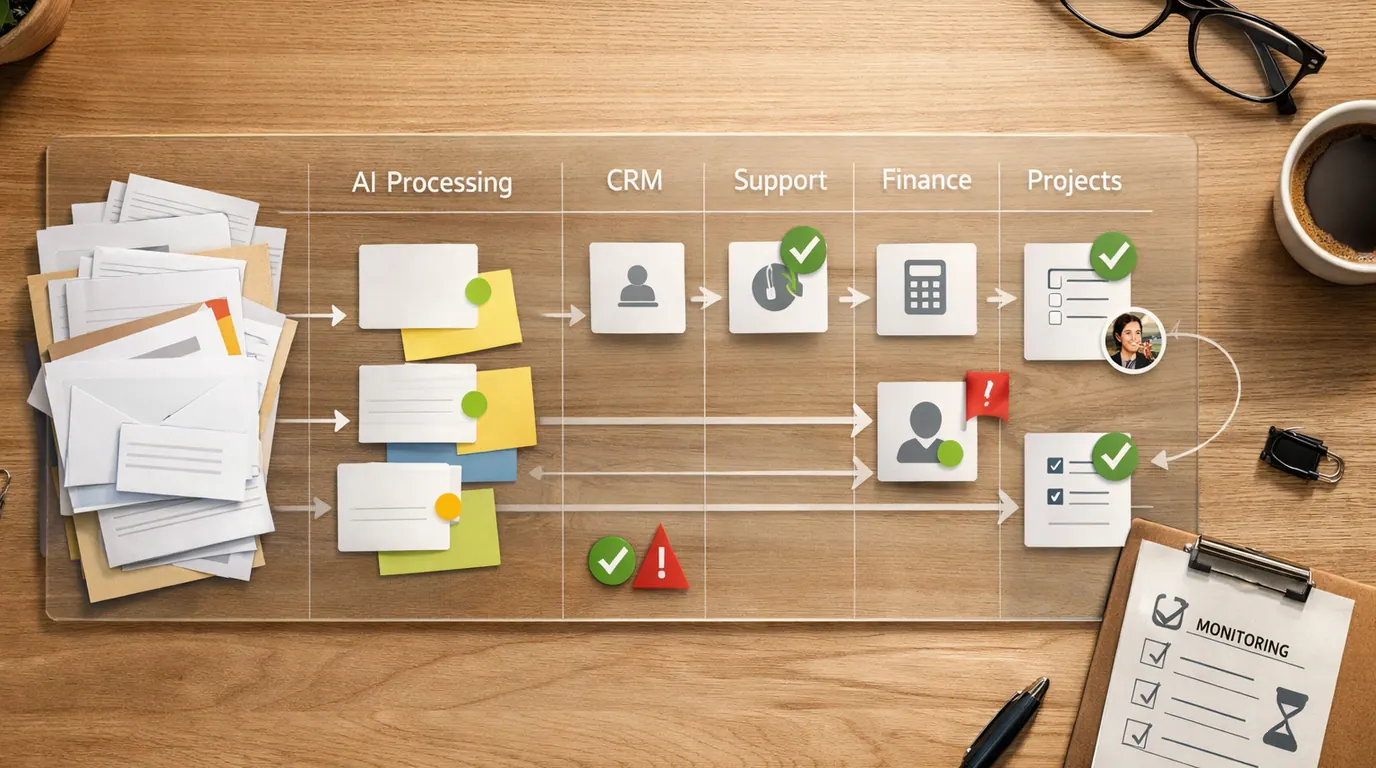
If you searched for “ai workflow automation”, the useful answer is not “connect every app to an AI agent.” The useful answer is a practical way to move repeated work from intake to decision to action without losing control of data, approvals, or accountability.
AI workflow automation works when the AI step has a narrow job: read a request, classify it, extract fields, summarize evidence, draft a response, choose a route, or ask a person to approve the next step. It fails when a team tries to automate judgment before it has a stable process.
Use this AI workflow automation guide as a business playbook. Start with one workflow, choose the right tool category, define the human review point, and measure whether the handoff gets clearer instead of merely faster.
Pick a repeated queue where work already enters through forms, email, chat, tickets, CRM, docs, or spreadsheets.
The workflow should produce a summary, classification, task, draft, record update, or approval request a person can inspect.
Route unclear, sensitive, high-value, or irreversible cases to a named owner before the automation acts.
What AI Workflow Automation Actually Means
An AI workflow is a repeatable business process that uses AI for one or more cognitive steps, not just mechanical app-to-app routing. Traditional automation can say, “When a form is submitted, create a task.” AI workflow automation can add, “Read the message, identify the customer type, extract the requested deadline, summarize the issue, decide whether this is urgent, and ask a manager to approve the reply.”
That does not make the process autonomous by default. In a good setup, AI handles the parts that are expensive to do manually but easy to review: classification, extraction, summarization, drafting, deduplication, and routing. People still own the rule, the exception, the customer promise, and the final call.
Every practical AI workflow automation workflow has five pieces:
- Trigger: the event that starts the workflow, such as a form, email, CRM update, ticket, file upload, calendar event, or Slack message.
- Context: the data AI is allowed to inspect, such as request text, customer records, approved documents, account fields, transcripts, or spreadsheet rows.
- AI step: the bounded task, such as classify urgency, summarize a call, extract invoice fields, draft a reply, or suggest a route.
- Action: the next system update, such as creating a task, sending an alert, updating CRM, creating a ticket, posting a draft, or pausing for review.
- Control: the test, approval, audit log, fallback, and owner that keep the workflow explainable when something changes.
Quick Picks: AI Workflow Automation Tools by Job
If you came in looking for the best AI workflow automation software, start with the job column. A tool that is excellent for broad no-code handoffs may be the wrong fit for self-hosted workflows, approval-heavy processes, or database-centered operations.
| Pick | Best for | Why it fits | Limit | Pricing/free-plan note |
|---|---|---|---|---|
| Zapier | Broad no-code automation across SaaS apps, forms, tables, chatbots, agents, and everyday team handoffs | Zapier is useful when the main job is connecting many apps quickly and turning AI output into downstream actions such as tasks, alerts, records, or drafts. | Complex branching, sensitive data, and high-volume production workflows still need owners, logs, and cleanup rules. | Zapier publishes current plan details on its pricing page. Check app limits, task volume, AI features, team controls, and enterprise needs before buying. |
| Make | Visual AI automation systems, scenario mapping, app connections, and teams that want to see each step | Make fits teams that need a visual builder for multi-step automations, AI model calls, app connections, and workflow maps that non-engineers can follow. | Visual workflows can still become hard to maintain if naming, ownership, and failure alerts are weak. | Make's public page mentions a free start and no time limit on the Free plan. Verify current operation limits, AI usage, teams, and pricing. |
| n8n | Technical teams that want visual workflows plus code, self-hosting options, custom logic, AI agents, RAG, and deeper observability | n8n fits teams that need low-code speed without giving up JavaScript, Python, custom APIs, on-prem options, human-in-the-loop steps, and testing with real data. | It rewards technical ownership. A business team without a maintainer can build workflows that nobody can debug later. | n8n has cloud and self-hosted routes. Check current cloud pricing, enterprise controls, hosting responsibility, and support model. |
| Relay.app | Predictable workflows with approvals, AI reviews, email or Slack review loops, and human-in-the-loop checkpoints | Relay.app is a fit when AI should prepare work but a teammate must approve, revise, or add missing information before the run continues. | It is not the best first choice if the team wants heavy custom code or infrastructure-level control. | Check current Relay.app pricing, usage limits, integrations, and approval-workflow controls before scaling. |
| Gumloop | AI agent workflows for GTM, support, recruiting, research, recurring monitoring, and teams that want AI steps on a canvas | Gumloop fits teams that want AI agents connected to internal and external data, scheduled runs, Slack or Teams interaction, and model flexibility. | Agent workflows can look impressive while hiding vague instructions. Require test cases, output schemas, and review points. | Check current Gumloop pricing, model usage, data connections, permissions, and enterprise controls. |
| Airtable | Record-centered operations where workflows live in tables, databases, approvals, content calendars, projects, or lightweight internal apps | Airtable fits when the source of truth is structured records and the AI workflow needs to summarize, categorize, update, or trigger work around those records. | It is weaker if your process mainly needs deep custom logic or app-to-app orchestration outside Airtable. | Check current Airtable AI packaging, workspace limits, automations, permissions, and plan requirements. |
This is a shortlist by workflow fit, not a universal ranking. For a smaller team, Zapier, Make, Relay.app, or Airtable may be enough. For a technical operations team, n8n may be the better control surface. For AI-heavy agent workflows, compare Gumloop and n8n before committing to one builder.
Selection Method and Pricing Caveats
This shortlist is based on the supplied research packet, SERP patterns around AI workflow automation tools, and a limited official-page check on June 5, 2026. Official pages reviewed during drafting included Zapier, Make, n8n, Relay.app, Gumloop, and Airtable AI.
This is not a hands-on benchmark, live security review, pricing audit, or claim that every product was implemented with the same data. Pricing, free tiers, AI credits, app limits, retention policies, and enterprise controls change quickly, so verify vendor pages and contracts before procurement.
The evaluation criteria were practical:
- Workflow fit: Does the product solve a repeated handoff, or does it only add a generic AI feature?
- Integration depth: Can it connect to the systems where work already happens, such as CRM, email, tickets, docs, chat, spreadsheets, databases, and APIs?
- AI control: Can the team specify prompts, structured outputs, model choice, retrieval sources, and test cases?
- Reviewability: Can a human inspect the AI output, approve an action, revise a draft, and understand why the workflow routed a case?
- Operational safety: Are there logs, alerts, permission controls, environment controls, rollback paths, and ownership practices?
- Cost shape: Are costs based on seats, tasks, runs, operations, credits, model usage, storage, or enterprise add-ons?
Ask vendors for the boring details before buying: data retention, model-training use, SSO, audit logs, role-based permissions, export rights, app connection permissions, error handling, uptime commitments, and who owns broken workflow cleanup.
Compare the Shortlist by Workflow Stage
AI workflow automation tools make more sense when you map them to the stage they improve. A single workflow may use one tool for the whole process, but the stages below help you spot where the real bottleneck lives.
| Workflow stage | What AI does | Tools to compare first | Human review point |
|---|---|---|---|
| Capture | Collects a form, email, chat, ticket, file, meeting transcript, or CRM event | Zapier, Make, Airtable, Relay.app | Confirm required fields, consent, source system, and whether sensitive data is allowed in the workflow. |
| Understand | Classifies urgency, extracts fields, summarizes context, detects sentiment, or identifies missing information | n8n, Gumloop, Relay.app, Zapier, Make | Review examples where the input is vague, emotional, adversarial, private, or high value. |
| Route | Chooses the owner, queue, project, CRM stage, support tier, channel, or escalation path | Zapier, Make, Airtable, n8n | Check territory rules, account ownership, SLA promises, duplicate records, and edge cases. |
| Draft | Creates a reply, task description, meeting note, status update, request summary, or customer follow-up | Gumloop, Relay.app, n8n, Zapier, Airtable | Verify facts, tone, commitments, dates, numbers, and whether the draft should be sent at all. |
| Approve | Pauses the run for a manager, teammate, finance owner, support lead, or compliance reviewer | Relay.app, n8n, Make, Airtable | Require explicit approval for payments, refunds, outbound messages, account changes, and irreversible actions. |
| Monitor | Logs failures, tracks manual edits, compares outputs, and reports recurring exceptions | n8n, Make, Zapier, Airtable | Review false positives, false negatives, stale prompts, broken integrations, and workflows with no active owner. |
The safest automation is the one that turns a fuzzy queue into a reviewed handoff, not the one that hides judgment behind a trigger.
AI Workflow Automation Examples You Can Reuse
The most useful AI workflow automation use cases are ordinary. They involve work that arrives repeatedly, contains messy language, and needs a clearer next step. These AI workflow automation examples are intentionally concrete so you can adapt them to your own tools.
| Use case | Everyday trigger | AI output | Action | Human review point |
|---|---|---|---|---|
| Support triage | A customer emails support about a login failure and a missed deadline. | Issue summary, urgency label, affected product, account lookup note, and suggested support tier. | Create or update a ticket, alert the right channel, and draft a first response. | Support lead checks account facts, anger level, SLA risk, and whether the draft overpromises. |
| Lead intake | A demo form arrives with company size, message, region, and requested timeline. | Fit summary, missing qualification fields, likely segment, and follow-up draft. | Create CRM task, route to owner, notify sales, and prepare reply. | Sales verifies fit, consent, territory, and claims before outreach. See [AI for Lead Generation](/blog/ai-for-lead-generation/) for the wider funnel. |
| Meeting follow-up | A sales, product, or customer success call transcript is uploaded. | Decisions, objections, owners, action items, risks, and CRM note draft. | Post summary, update tasks, and draft follow-up email. | Meeting owner checks speaker attribution, deadlines, commitments, and sensitive details. |
| Internal request routing | An employee asks for software access, equipment, policy help, or a data change. | Request type, urgency, approval need, missing fields, and suggested owner. | Create IT, HR, finance, or ops ticket with the right form fields. | Operations checks access level, budget approval, personal data, and whether the request needs a manager. |
| Invoice exception review | A vendor invoice arrives with a mismatch against purchase order or contract terms. | Extracted fields, mismatch summary, possible reason, and reviewer note. | Route to finance owner and pause payment until approval. | Finance verifies amounts, tax, vendor identity, contract terms, and fraud signals. |
| Content operations | A campaign brief, blog draft, or social request enters a marketing queue. | Brief summary, channel classification, missing assets, claim risks, and task breakdown. | Create content tasks, assign reviewer, and prepare editorial checklist. | Marketing checks brand claims, source support, launch dates, and customer-sensitive language. |
| Chatbot handoff | A website chatbot cannot answer a visitor's question or identifies a qualified lead. | Conversation summary, lead details, unresolved question, and suggested handoff path. | Create a ticket, CRM record, or human follow-up task. | A person reviews the conversation before customer-facing action. For setup details, use [How to Build an AI Chatbot](/blog/how-to-build-an-ai-chatbot/). |
If the input is mostly structured and the rule is obvious, simple automation may be enough. If the input is unstructured and the next action depends on meaning, AI is more useful. If the action is sensitive or irreversible, keep the workflow paused until a person approves it.
Build Your AI Workflow Automation Strategy
An AI workflow automation strategy should be smaller than most teams expect. Do not begin with “automate operations.” Begin with one sentence that names the trigger, AI job, system action, reviewer, and stop rule.
When [trigger] happens for [audience or process], AI will [classify, extract, summarize, draft, or route], then [system action] will happen only after [human owner] reviews [specific risk or output].Examples:
- Customer support: when a new ticket mentions billing, outage, or account access, AI summarizes the issue and suggests severity, then support reviews before the SLA timer and customer reply are updated.
- Sales operations: when a qualified demo request arrives, AI extracts company details and drafts a follow-up, then the account owner reviews before sending or booking a meeting.
- Finance: when an invoice differs from the purchase order, AI extracts the mismatch and routes it to finance, then payment stays paused until approval.
- HR and IT: when a new employee needs access, AI checks the role, app list, and start date, then IT approves permissions before provisioning.
- Reporting: when weekly metrics are uploaded, AI drafts a summary and flags anomalies, then the manager verifies the spreadsheet logic before sharing. The review habits in How to Use AI in Excel apply here.
Use this seven-step rollout:
- Name the workflow: choose one queue, one trigger, one output, and one owner.
- Write the current process: document who receives work, what they inspect, which system changes, and where mistakes happen.
- Choose the AI step: pick one bounded job: classify, extract, summarize, draft, enrich, route, or ask for missing information.
- Define the review rule: state which outputs need approval, which cases auto-route, and which cases must stop.
- Test real examples: use recent tickets, forms, messages, transcripts, invoices, or spreadsheet rows, including messy edge cases.
- Launch in shadow mode: compare AI suggestions against human decisions before letting the workflow update live systems.
- Measure cleanup burden: track edit rate, false routes, failure alerts, time saved, customer impact, and manual rework after 30 days.
For broader team rollout, pair this with the ownership model in AI Productivity Tools for Teams. A workflow is not ready to scale until someone owns prompt changes, connected app permissions, error alerts, and the process map.
Human Review and Failure Modes
AI workflow automation is powerful because it moves faster than manual coordination. That is also why weak review is dangerous. A bad classification can route a customer to the wrong queue. A draft can promise the wrong deadline. A broken integration can duplicate records. A stale prompt can keep acting after the business rule changed.
Use AI confidently when it prepares work for a person. Slow down when it decides for a person.
Works Well When
- The workflow repeats every week and has a clear source of truth.
- The AI output can be inspected before customer-facing or irreversible action.
- The team has real examples for testing edge cases and failures.
- There is a named owner for prompts, app connections, alerts, and cleanup.
- The workflow creates logs, approval history, and a fallback route.
Watch Out For
- The process is not documented, and humans disagree about the correct next action.
- The AI would send messages, approve spend, reject people, change access, or update billing without review.
- The workflow uses private data in tools that security, legal, or IT have not approved.
- Nobody knows who fixes the workflow when an app schema, prompt, model, or integration changes.
- The team cannot explain why the AI routed, scored, or rejected a case.
Common review points:
- Before sending: customer emails, sales follow-ups, public content, legal-sensitive statements, and refund messages.
- Before changing access: user permissions, employee provisioning, vendor access, admin roles, and account recovery.
- Before updating money: invoices, refunds, discounts, contract changes, payment approvals, and revenue forecasts.
- Before affecting opportunity: hiring, lending, insurance, education, healthcare, housing, or any decision with fairness and compliance implications.
- Before trusting a summary: meeting notes, incident reports, analytics summaries, customer complaints, and executive updates.
Privacy is not a side issue. If the workflow touches customer messages, employee data, contracts, transcripts, invoices, or account records, review the data boundary first. Our AI Privacy Concerns guide covers the questions to ask before a tool sees sensitive inputs.
AI Workflow Automation Checklist
Use this AI workflow automation checklist before your first pilot goes live:
- Pick one workflow: one trigger, one audience, one owner, one output, and one system of record.
- Define success: faster routing, fewer missed follow-ups, lower manual classification, cleaner records, or better review quality.
- Map the current handoff: document inputs, fields, decisions, systems, reviewers, and common failure cases.
- Choose the AI role: classify, extract, summarize, draft, enrich, route, or prepare an approval request.
- Set data rules: list which data may enter the tool, which data is forbidden, and how outputs are stored.
- Write the stop rules: high value, low confidence, private data, angry customer, regulated topic, unsupported request, or irreversible action.
- Build test cases: include normal examples, vague inputs, missing fields, duplicates, edge cases, and known past mistakes.
- Run in shadow mode: compare AI recommendations with human decisions before letting actions run automatically.
- Add monitoring: log runs, approvals, failures, manual edits, false routes, prompt changes, and app connection errors.
- Review after 30 days: keep, change, or stop the workflow based on quality, cleanup burden, risk, and measurable handoff improvement.
The best first pilot is usually support triage, lead intake, meeting follow-up, internal request routing, or report summarization. The riskiest first pilots are automatic customer messaging, account changes, financial approvals, employment decisions, legal review, and any workflow where nobody can inspect the source.
The Bottom Line
AI workflow automation is worth using when it turns repeated messy input into a cleaner, reviewable next action. It is not worth using when the team has no owner, no test cases, no data boundary, and no agreement about what the correct decision should be.
Start small: one trigger, one AI step, one human review point, one system action, and one 30-day measurement loop. If the workflow saves time but adds hidden cleanup, fix the process before expanding. If it makes the handoff clearer and safer, then scale to adjacent workflows.
For most businesses, the best AI workflow is not fully autonomous. It is a practical operating loop where AI prepares the work, systems move it forward, and people stay accountable for judgment.
Frequently asked questions
What is AI workflow automation?
AI workflow automation uses AI inside a repeatable process to classify inputs, summarize context, draft outputs, route work, or decide the next step across business systems. It is most useful when the workflow has clear inputs, clear owners, and a human review point for exceptions or risky outcomes.
What are the best AI workflow automation tools?
The best AI workflow automation tools depend on the job. Zapier fits broad no-code app handoffs, Make fits visual scenario building, n8n fits technical teams that want code and self-hosting options, Relay.app fits approval-heavy workflows, Gumloop fits AI agent workflows, and Airtable fits record-centered operations. Check current vendor pricing.
How is AI workflow automation different from regular automation?
Regular automation usually follows fixed rules: if a form arrives, create a task. AI workflow automation can also interpret unstructured text, extract fields, classify urgency, draft a reply, summarize evidence, or route based on meaning. That flexibility adds value, but it also requires testing and human review.
What workflow should a business automate first?
Start with a low-risk, high-frequency handoff such as support triage, lead intake, meeting follow-up, internal request routing, spreadsheet cleanup, or document summarization. Avoid your most sensitive approval, refund, hiring, legal, finance, or customer-impacting decision until the team has monitoring and review habits.
Does AI workflow automation replace employees?
It usually replaces manual handoff work, not the accountable person. AI can prepare summaries, classifications, drafts, task updates, and suggested actions, while employees still approve exceptions, check facts, handle judgment calls, and own the final decision. The safest workflows make that split explicit.
What risks matter most in AI workflow automation?
The main risks are wrong classifications, private data exposure, broken integrations, prompt drift, unreviewed customer messages, hidden decision logic, and vendor lock-in. Every pilot needs test cases, failure alerts, access controls, source checks, audit history, and a named owner for cleanup.





