
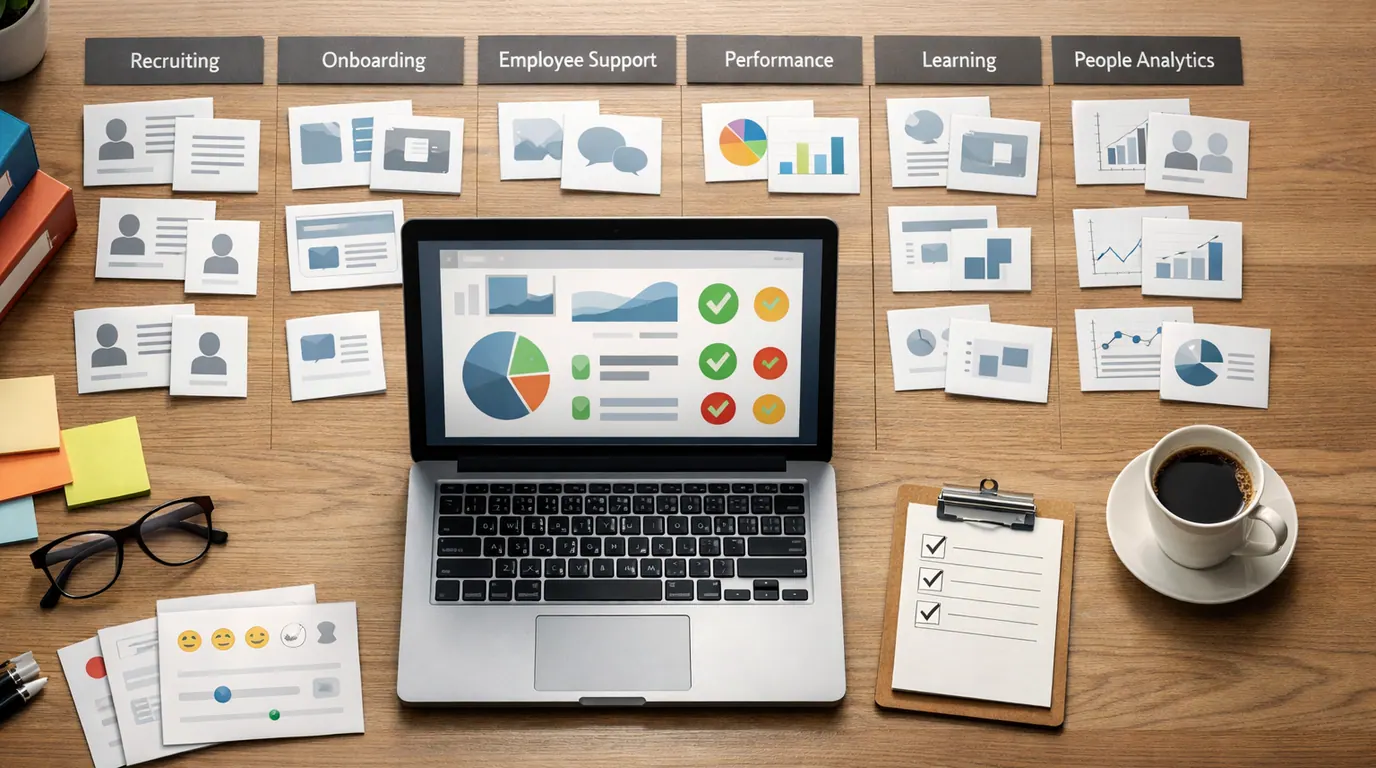
If you searched for “ai in hr”, the useful answer is not that artificial intelligence will make Human Resources disappear. The useful answer is more practical: AI can help HR teams draft, summarize, route, analyze, and personalize work, but people still own decisions that affect employees and candidates.
AI for HR is already showing up in recruiting, onboarding, employee self-service, performance reviews, learning, benefits, payroll support, workforce planning, and engagement analytics. The hard part is not finding tools. The hard part is choosing a workflow where AI makes the next human step clearer.
Use this AI in HR guide as a playbook. Start with one workflow, define the review point, protect employee data, and measure whether the work becomes more consistent instead of merely faster.
Pick recruiting, onboarding, HR support, learning, engagement, performance, payroll, or workforce planning before shopping for tools.
The AI should produce a draft, summary, pattern, recommendation, or route that HR can inspect before action.
Keep humans responsible for hiring, pay, promotion, discipline, leave, accommodation, and termination decisions.
What AI in HR Actually Means
AI in HR means using machine learning, natural language processing, generative AI, analytics, or intelligent automation to improve HR work. In everyday terms, it helps HR teams turn messy people operations into clearer next steps: a candidate shortlist, an onboarding checklist, a policy answer, an engagement theme, a training recommendation, or a workforce planning brief.
IBM describes AI in HR as a mix of algorithms, machine learning, and intelligent systems that can automate repetitive tasks and analyze HR data. Workday emphasizes recruiting, talent management, and employee experience. SAP frames AI for HR as part of HR’s shift from administration to strategic business partnership. Those views point to the same operational truth: AI is most useful when it supports HR judgment, not when it hides it.
This matters because HR is not just another back-office function. HR data is sensitive, and HR decisions can change someone’s career, income, benefits, or sense of fairness at work. A useful HR AI pilot makes the next human decision clearer, not quieter.
Quick Map: AI in HR Use Cases by Workflow
The strongest AI in HR use cases are ordinary. They reduce repetitive drafting, summarize large volumes of text, detect patterns in employee data, and route requests to the right person. Start with the workflow where your team already has clear rules and enough examples to review output quality.
| HR workflow | What AI can prepare | Everyday example | Human review point |
|---|---|---|---|
| Recruiting and sourcing | Job description drafts, candidate summaries, interview questions, outreach, shortlist explanations | A recruiter receives 180 applications and uses AI to summarize must-have matches and borderline cases. | A recruiter verifies criteria, bias risk, accommodations, and every rejection or advancement decision. |
| Onboarding | Role-based onboarding plans, first-week checklists, policy summaries, task routing, manager nudges | A new finance analyst receives a plan based on role, location, systems access, and required training. | HR checks policy accuracy, access permissions, manager ownership, and local compliance details. |
| Employee self-service | Policy answers, HR ticket classification, benefits guidance drafts, escalation notes | An employee asks about PTO carryover, expense rules, or parental leave and receives a draft answer from approved policy content. | HR reviews ambiguous, sensitive, jurisdiction-specific, or exception-heavy cases before responding. |
| Performance and feedback | Review summaries, goal drafts, feedback themes, calibration notes, manager coaching prompts | A manager turns notes into a structured performance review draft with examples and missing evidence flagged. | Managers and HR verify facts, tone, fairness, protected-class issues, and whether the review reflects real work. |
| Learning and internal mobility | Skill gap summaries, course suggestions, mentor matches, role-path recommendations | AI suggests learning paths for employees moving from support to customer success or operations. | HR checks business need, access equity, employee consent, and whether recommendations rely on stale data. |
| Engagement and people analytics | Survey theme grouping, sentiment patterns, attrition risk signals, workforce planning briefs | HR reviews open-text survey comments and sees recurring burnout themes in two teams. | People leaders verify context, avoid over-reading sentiment, and decide interventions with managers. |
| Payroll, benefits, and compliance support | Exception flags, documentation checklists, employee communication drafts, audit summaries | Payroll sees unusual changes or missing fields before a pay run. | Payroll, HR, finance, or legal owners verify numbers, rules, privacy, and any employee-impacting action. |
For recruiting specifically, use the deeper AI for Recruitment guide. The same principle applies across HR: let AI prepare evidence, but make people own the decision.
Choose the Best AI in HR Fit by Bottleneck
The best AI in HR choice is the one that fits your bottleneck, system of record, and risk level. A large company already running Workday, SAP SuccessFactors, Oracle Cloud HCM, or a similar HCM suite may want embedded AI because governance, employee records, permissions, and reporting already live there. A smaller team may get more value from a narrow tool for recruiting notes, policy support, engagement analysis, or workflow automation.
Do not begin with a vendor demo. Begin with a sentence:
Our HR team needs AI to help [workflow owner] turn [input] into [reviewable output], so [human reviewer] can approve [next action] without exposing [sensitive data or decision risk].Use this table to narrow the search before comparing products.
| Bottleneck | Tool pattern to compare | Good fit when | Watch for |
|---|---|---|---|
| Recruiting volume | ATS-native AI, sourcing assistants, interview note tools, talent intelligence platforms | Recruiters need summaries, source evidence, outreach drafts, or structured interview notes. | Black-box fit scores, automatic rejection, weak candidate consent, and inconsistent scorecards. |
| HR support queue | Employee self-service chatbot, HR ticketing AI, knowledge-base assistant | Employees ask repeatable policy questions and HR has approved source documents. | Wrong policy answers, local-law differences, private data leakage, and no escalation path. |
| Manager enablement | Review drafting, coaching prompts, performance workflow support | Managers need structure for goals, feedback, one-on-ones, and review evidence. | Generic feedback, unfair language, unsupported claims, and overreliance on AI-written reviews. |
| Engagement analysis | Survey analytics, sentiment grouping, people analytics assistant | HR needs to summarize open-text feedback and spot patterns across teams. | Treating sentiment as fact, exposing small-group identities, and ignoring local context. |
| Learning and mobility | Skills intelligence, learning recommendation, internal marketplace tools | The company wants to connect skills, roles, projects, mentors, and development plans. | Stale skills data, unequal access, opaque recommendations, and employee trust issues. |
| HR operations | Workflow automation, document summarization, approval routing, audit preparation | The process has clear inputs, owners, and review rules. | Automating a messy process before the team agrees on the right rule. |
If your team is comparing “best AI in hr” options, ask vendors for evidence on five boring details: data retention, model-training use, audit logs, permission controls, and how HR can override the AI. Pricing and free-plan terms change quickly, so verify current vendor pages and contracts before procurement.
Build a Safe AI in HR Workflow
An AI in HR workflow should be narrow enough to test and visible enough to audit. Do not launch with “AI for HR.” Launch with “AI drafts onboarding checklists for new sales hires” or “AI groups engagement survey comments by theme for HR review.”
Use this rollout process:
- Name the employee journey stage: candidate, new hire, employee, manager, HRBP, payroll, learning, engagement, or exit.
- Map the current input: resumes, tickets, policies, forms, survey comments, performance notes, call transcripts, payroll exceptions, or learning records.
- Choose one AI job: summarize, classify, draft, extract, compare, recommend, route, or flag an exception.
- Define the review rule: state who checks the output, what they verify, which cases stop, and which cases may continue automatically.
- Run a shadow test: compare AI output with normal HR work before employees or candidates are affected.
- Measure edit burden: track false positives, false negatives, privacy issues, manager edits, employee complaints, and time spent correcting output.
- Scale only after governance is clear: document owners for prompts, policies, connected systems, approvals, vendor management, and incident response.
This structure also works for broader people operations. If the workflow crosses apps, forms, tickets, and approvals, pair this with the AI Workflow Automation rollout model.
AI in HR Examples You Can Reuse
Good AI in HR examples are concrete enough to test with last week’s work. The goal is not to prove that AI can do HR. The goal is to find one place where HR already has source material, clear rules, and a human who can review the result.
| Example | Input | AI output | Review before use |
|---|---|---|---|
| Inclusive job description draft | Role notes, must-have skills, salary band, location, hiring criteria | Job description draft, unclear requirements, possible exclusionary language, interview question ideas | Recruiter and hiring manager verify accuracy, pay range, legal requirements, and whether requirements are truly necessary. |
| New hire onboarding plan | Role, location, start date, manager notes, required systems, policy links | First-week checklist, training plan, manager reminders, missing setup tasks | HR verifies access approvals, local policy, manager ownership, and whether sensitive employee details are excluded. |
| Policy question triage | Employee question and approved policy documents | Suggested answer, confidence note, source policy section, escalation recommendation | HR checks source accuracy, exceptions, location-specific rules, and whether the case needs confidential handling. |
| Performance review preparation | Manager notes, goals, peer feedback, project outcomes, review rubric | Structured draft with evidence, missing examples, strengths, risks, and development themes | Manager and HR verify evidence, tone, fairness, bias risk, and whether the output overstates performance conclusions. |
| Engagement survey analysis | Anonymous survey comments and scores | Theme clusters, sentiment patterns, representative concerns, possible interventions | HR protects small-group anonymity, checks context with leaders, and avoids treating AI sentiment as proof. |
| Exit interview synthesis | Exit interview notes and departure reasons | Common themes, retention risks, suggested follow-up questions, action plan draft | HR removes identifying details, checks pattern validity, and separates individual grievances from organization-wide themes. |
| Payroll exception review | Timesheet changes, payroll rules, missing fields, approval records | Exception summary and reviewer checklist | Payroll verifies numbers, approvals, employee communication, and compliance before any pay-impacting action. |
The safest early examples are drafts and summaries. The riskiest examples are automated ranking, automated rejection, compensation recommendations, disciplinary suggestions, and any workflow that uses sensitive employee data without a documented review path.
AI in HR Template: One-Page Pilot Brief
Use this AI in HR template before buying or building. It forces the team to name the workflow, the data boundary, and the decision owner in plain language.
Pilot name:
[Specific workflow, such as "policy question triage for HR support tickets"]

Employee journey stage:
[Candidate, onboarding, employee support, performance, learning, engagement, payroll, exit]

Current pain:
[What is slow, inconsistent, hard to review, or expensive today?]

Input AI may use:
[Approved documents, anonymized notes, ticket text, survey comments, role criteria, training catalog]

Input AI may not use:
[Sensitive employee records, medical details, investigation notes, compensation data, private candidate data]

AI job:
[Summarize, classify, draft, extract, recommend, route, or flag]

Required output:
[Table, checklist, draft answer, summary, theme list, reviewer note, exception report]

Human reviewer:
[Role and person/team responsible for approval]

Stop rule:
[Cases that must not continue without human review]

Success signal:
[Lower edit time, fewer missed tickets, faster onboarding setup, clearer manager reviews, better survey theme coverage]

Failure signal:
[Wrong policy answer, privacy issue, biased output, high edit rate, employee complaint, unclear ownership]
For prompt-heavy HR work, the template structure is the same as other business prompts: role, context, source material, constraints, output format, and review rule. The ChatGPT Prompts for Business library has reusable wording for HR, operations, finance, and leadership workflows.
AI in HR Checklist Before You Launch
Use this AI in HR checklist before a pilot reaches employees, candidates, or managers.
Do
- Start with one workflow and one reviewable output.
- Use approved source documents and known HR criteria.
- Keep sensitive employee data out of unapproved tools.
- Test real examples, including messy and edge cases.
- Track edits, overrides, complaints, and failure patterns.
- Name the human owner for final decisions.
Don’t
- Let AI reject candidates, discipline employees, or change pay without review.
- Use vague job criteria and expect the model to infer fairness.
- Paste confidential records into public tools without approval.
- Treat sentiment analysis as proof of employee intent.
- Hide AI use from the people who must trust the process.
- Scale a workflow nobody owns after launch.
Works Well When
- The process repeats often and has clear source material.
- The AI output can be reviewed before it affects an employee or candidate.
- HR, legal, security, IT, or compliance owners agree on the data boundary.
- The team can explain why the output was accepted, edited, or rejected.
- There is a fallback path when the tool is wrong, unavailable, or uncertain.
Watch Out For
- The workflow affects hiring, pay, promotion, discipline, leave, or termination without human approval.
- The vendor cannot explain data retention, model-training use, permissions, or audit logs.
- The team has inconsistent policies, stale documents, or unclear ownership.
- Managers would use AI-written feedback without checking examples and fairness.
- Employees cannot tell where to escalate, correct, or challenge an AI-supported output.
For privacy work, do not rely on a generic AI policy alone. HR should review what data the tool receives, where it is stored, whether it trains models, who can access outputs, how long records are kept, and how employees can challenge mistakes. The practical questions in AI Privacy Concerns apply directly to HR data.
Governance and Metrics for HR Leaders
AI in HR strategy should connect to measurable work, not a vague transformation slide. Pick metrics that show whether the process is better for HR and safer for employees.
Useful metrics include:
- Edit rate: how much HR changes AI drafts, summaries, or classifications before use.
- Override rate: how often humans reject or change recommendations.
- False negative rate: how often AI misses important cases, qualified candidates, policy exceptions, or employee concerns.
- Cycle time: whether tickets, onboarding tasks, review drafts, or recruiting handoffs move faster after review.
- Employee experience: whether employees receive clearer answers, faster support, and better escalation paths.
- Risk events: privacy issues, wrong policy answers, biased language, accessibility problems, or vendor failures.
- Adoption quality: whether HR and managers understand when to use the tool and when to stop.
SHRM’s 2026 research shows HR leaders expect more AI integration in workforce and HR processes, while MIT Sloan Management Review argues that AI raises pressure for HR to become more strategic instead of only administrative. That strategic role depends on governance. HR should help the company define acceptable AI use for employees, not only automate HR’s own queue.
Assign owners for four layers:
- Workflow owner: accountable for the HR process and final decision quality.
- Data owner: accountable for employee data use, retention, access, and deletion.
- Tool owner: accountable for vendor settings, integrations, permissions, and incident response.
- Review owner: accountable for audits, overrides, complaints, and improvement after launch.
Without those owners, AI can make HR work faster while making accountability weaker. That is the wrong trade.
The Bottom Line
AI in HR is worth using when it gives HR better drafts, cleaner summaries, faster routing, sharper patterns, and more consistent review. It is not worth using when it turns sensitive employment decisions into opaque automation.
Start with a low-risk workflow, such as onboarding checklists, policy question triage, engagement theme grouping, or interview-note cleanup. Define the data boundary, test real examples, keep a named human reviewer, and measure edits before scaling.
The practical goal is not to make HR less human. The practical goal is to spend less HR time on repetitive paperwork and more time on the judgment, fairness, coaching, and trust that employees actually need.
Frequently asked questions
What does AI in HR mean?
AI in HR means using artificial intelligence to support human resources work such as recruiting, onboarding, employee support, learning, performance, workforce planning, and people analytics. The safest version prepares drafts, summaries, recommendations, or alerts that HR can review before action.
What are the best AI for HR use cases?
The best AI for HR use cases are repeated, document-heavy, and easy to review: job description drafts, candidate summaries, onboarding plans, policy question triage, survey theme analysis, learning recommendations, and HR ticket routing. Avoid starting with automated rejection, pay decisions, or discipline.
Can AI replace HR professionals?
AI can replace some manual HR tasks, but it should not replace HR accountability. Employee relations, hiring judgment, accommodations, sensitive investigations, compensation, culture, and leadership coaching all require context, empathy, and responsibility that a tool cannot own.
How should HR choose AI tools?
Choose AI tools by HR workflow, not by the broadest feature list. Compare whether the tool fits your existing HCM, ATS, ticketing, survey, or learning system; whether outputs are explainable; how employee data is handled; and where a human can approve, edit, or override results.
What HR data should not be pasted into public AI tools?
Do not paste employee records, compensation data, health information, investigation notes, performance issues, candidate personally identifiable information, legal documents, or confidential business plans into a public AI tool unless your organization has approved that use and the data controls are clear.
Where should a small HR team start with AI?
A small HR team should start with one low-risk workflow such as policy FAQ drafts, onboarding checklists, interview question drafts, meeting-note summaries, or engagement survey theme grouping. Run it in review mode first, track edits, and only expand after the output is consistently useful.





